Map Generation Settings
The Map Generation panel tells Rust's map generator how it may spawn your monument. It holds the same settings Rust's own monuments have, with Rust's own names and values. When you run the generator in the Procedural Generation panel, it can then place your monument the way it places Rust's.
Before you start
- Save the monument in the Custom Monuments folder. The generator reads the saved file, not the monument you have open.
- Add monument attributes, such as Terrain Anchors and Terrain Filters, so the monument lands on suitable ground. Without anchors, the monument keeps the ground height of the spot the generator picked.
How to let the generator spawn a monument
- Open the monument. See Create and edit monuments.
- Select the root, the top row in the Hierarchy.
- In the Map Generation panel in the Inspector, turn on Enabled. The other settings show.
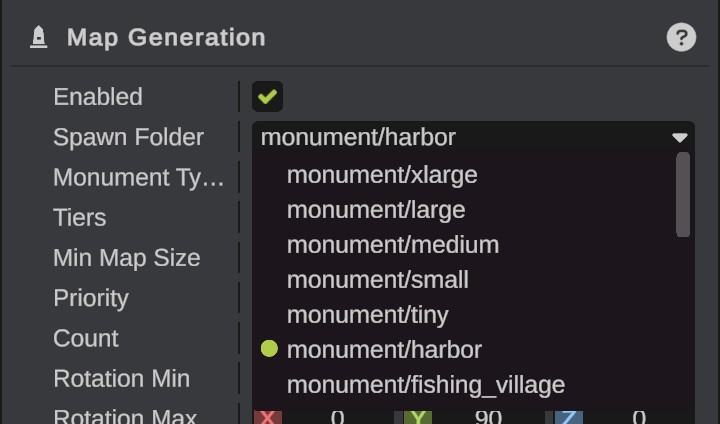
- Pick a Spawn Folder. This sets which of Rust's monument steps places the monument.
- Set the other options. See Options.
- Save the monument.
- Go back to your map and run the generator in the Procedural Generation panel.
The Procedural Generation panel shows, on each of Rust's monument steps, which of your monuments join it by their spawn folder.
Spawn folders
Rust keeps its monuments in folders, and each monument step of the map generator places the monuments of its folders. Your monument joins the step that reads the folder you pick, together with Rust's monuments in that folder.
The folders are: monument/xlarge, monument/large, monument/medium, monument/small, monument/tiny, monument/harbor, monument/fishing_village, monument/lighthouse, monument/cave, monument/swamp, monument/ice_lakes, monument/roadside, monument/offshore, monument/arctic_bases, monument/military_bases, monument/jungle_ruins, mountain, unique_environment/canyon, unique_environment/jungle, unique_environment/lake and unique_environment/oasis.
A new monument has monument/medium.
Pick the folder of Rust's monuments that are most like yours. A step uses its own settings, such as how many monuments it places and how far apart, for your monument too. A monument in monument/roadside is placed along a road; see Path Connection.
Monument steps
You can also place monuments with a step of your own:
- In the Procedural Generation panel, click Add Monument Step.
- Under Custom Monuments, use Add to put monuments in the step's list. A monument in the list twice can be placed twice.
- Drag the step's row to run it at another place among Rust's steps.
A monument step places its monuments with Rust's monument placer, using each monument's Map Generation options and attributes. A monument does not need Enabled on to be in a monument step's list. See Steps and presets.
Options
| Option | What it does |
|---|---|
| Enabled | On: the generator may spawn this monument in the step of its Spawn Folder. The other options show only while it is on. |
| Spawn Folder | The folder of Rust's monuments it joins. |
| Monument Type | The kind of monument, as Rust sorts its monuments. Rust's road step does not lead roads to a Roadside monument. |
| Tiers | The tier areas of the map it may spawn in. Three corners of its square must be in one of them. |
| Min Map Size | It does not spawn on maps smaller than this, in meters. 0 lets it spawn on every size. |
| Priority | Monuments with a higher priority spawn first and get the best places. |
| Count | How many times it is in its step's list. More makes it more likely, and it can then spawn more than once. 0 leaves it out. |
| Rotation Min and Rotation Max | The smallest and largest random turn it gets, in degrees on each axis. A new monument turns from -180 to 180 degrees around the up axis. |
| Show On Map | Shows its name on the map. |
| Map Name | The name on the map. Empty uses the monument's name. |
The field-by-field reference is on the Map Generation page.
The monument's square
For the generator, the monument's bounds are its whole square: the Monument Size you picked when you made it, by 1000 meters high. The generator uses the square to keep monuments apart, and checks the tier areas at its corners. A monument much bigger than its build keeps other monuments further away than it needs to.
What happens when the generator places a monument
- The monument spawns as a linked monument, the same as one you place by hand. See Linked monuments.
- Its terrain goes onto the map, and its Placement Blockers mark their ground.
- When its step runs before Rust's erosion step, its terrain is baked into the map, so erosion and the later steps work on it. Otherwise it stays live, like the terrain of a monument you place by hand.
- The later steps do not see it as a monument. Generated roads, rails, power lines and trails do not lead to its Path Connections, and later monument steps do not keep their distance from it. Its Placement Blockers still keep later monuments, decor and roads off the ground they mark.
Troubleshooting
The monument never spawns.
- Check that Enabled is on and the monument is saved in the Custom Monuments folder.
- Check that its Spawn Folder is one that a step in your preset reads, and that the step is on. The step's row in the Procedural Generation panel lists the monuments that join it.
- Check Min Map Size, Tiers and Count.
- Loosen the attributes: larger anchor and check Extents, fewer filter limits. A monument with a smaller square also fits in more places.