Host a Session
RustEdit ProThe host is the person whose map the session edits. When you host, other people connect to your computer, get your map, and edit it with you.
Before you start
- Open the map you want to share, or make a new one. See Create, open and save maps.
- Save it. People who join get a copy, but the map file stays on your computer.
- Decide where the others are:
- On your network (same house or office): nothing else to do.
- On the internet: your router must send the port you host on to your computer. This is called port forwarding, and you set it up in your router. Use a TCP port.
How to host
- Open .
- In Session, type Your Name. The others see this name. RustEdit fills in your Windows user name the first time, and remembers what you type.
- In Host, check Port. The default is
28090. Use the port your router forwards, if you forward one. - Optional: type a Password. Only people with the same password can join. Leave it empty for no password.
- Click Host This Map.
The status changes to "Hosting, 1 in the session", and the Share section opens.
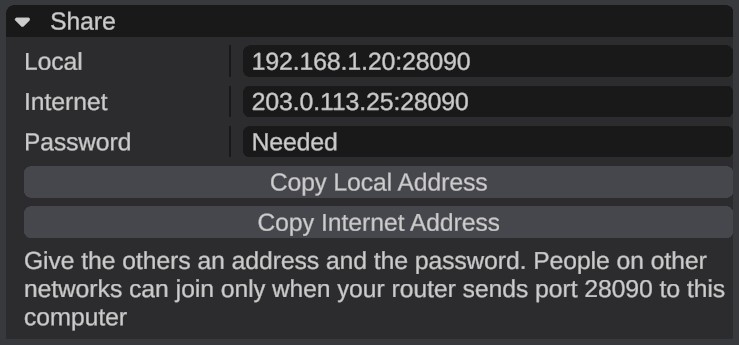
Give the others an address
The Share section shows what people need to join:
| Row | What it shows |
|---|---|
| Local | Your address and port on your own network, for people in the same house or office. If more than one shows, the first is most likely the right one. |
| Internet | Your internet address and port, for people on other networks. It only works when your router sends the port to your computer. |
| Password | Needed or None: whether the others must type your password. |
- Click Copy Local Address or Copy Internet Address. The address and the port, like
192.168.1.20:28090, go to your clipboard. - Send it to the others, with the password if you set one.
- They paste it in Address when they join. See Join a session.
info
To find your internet address, RustEdit asks the website api.ipify.org, which answers with the address your request came from. If it cannot be reached, Internet shows "Not found".
While you host
- Each person who joins gets your map and the custom monument and custom data files it needs. The Notifications panel says "... joined the session", then "Sent the map to ...", with the size.
- The People section lists everyone. Your own row says "you", and the host's row says "host".
- Big maps take a little while to send. People can keep working while it goes: their changes wait and arrive after the map.
- If you open or make another map, everyone gets that map instead.
- If you open a custom monument to edit it, people who join meanwhile get the map when you are back on it.
warning
The session's map is your file. The others get a copy without a file name, and if they save, they save their own copy. Save often with or Ctrl+Shift+S.
Stop hosting
Click Leave in Session. As the host, this ends the session for everyone.
Troubleshooting
| Problem | What to do |
|---|---|
| "Could not host on port ..." | Another program uses that port. Pick another Port and try again. |
| People on your network cannot join. | Check that they use the Local address and the right port, and that Windows Firewall lets RustEdit accept connections. |
| People on the internet cannot join. | Forward the TCP port to your computer in your router, then give them the Internet address. |
| "Someone tried to join with a wrong password" | Give that person the right password. |
| Somebody cannot join: "The app versions differ." | Everyone must use the same RustEdit version. |
| "Multiplayer needs RustEdit Pro" | Hosting needs RustEdit Pro. See RustHQ Account. |