Layouts
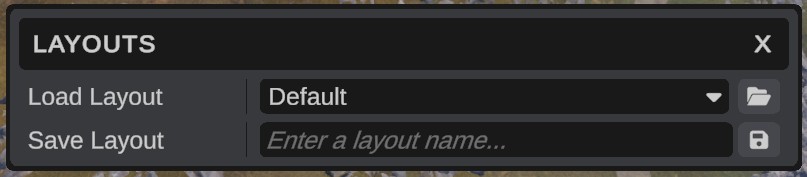
A layout is where each panel sits: which panels are open, how big they are, which tabs are in front, and which panels are in windows of their own. Save layouts for different jobs, for example one for terrain work and one for placing prefabs, and switch between them.
The layout you had last time
RustEdit saves the layout when you quit and opens it again at the next start. You do not have to save anything to keep your panels where they are.
Save a layout
- Arrange the panels the way you want. See The interface.
- Open . The Layouts dialog opens. You can still move panels while it is open.
- Type a name in Save Layout. Use letters and numbers only.
- Click the save icon next to the name.
Notifications says You have saved the current layout as : and the name. Saving with a name that exists already replaces that layout.
Load a layout
- Open .
- Pick a layout in Load Layout.
- Click the folder icon next to the list (Load).
The panels move at once.
Reset the layout
Load the layout called Default. It puts the Hierarchy on the left, the Scene view in the middle, the Content Browser and Notifications under it, and the Inspector on the right.
If you save a layout with the name Default, it replaces the built-in one. To get the built-in Default back, close RustEdit and delete Default.json from the Configuration/layouts folder.
Detached windows
A layout also saves the panels that are in windows of their own, with each window's place and size. When a layout opens a window:
- A window that fits on your monitors opens where it was, also across two monitors.
- A window that would be off screen, for example after you unplugged a monitor, moves onto the nearest monitor and shrinks to fit.
- A window that was maximized opens at its normal size.
Where layouts are saved
Each layout is a .json file in Configuration/layouts in RustEdit's folder. The file name is the layout name. The layout RustEdit opens at start is last_layout.json.
- To delete a layout, close RustEdit and delete its file. There is no delete button.
- To share a layout, copy its file to the same folder on another computer.
Troubleshooting
| Problem | What to do |
|---|---|
| You must enter a layout name | Type a name in Save Layout before you click save. |
| [Interface] The dock has no panels, the saved layout ... is kept | RustEdit does not save an empty layout. Open at least one panel. |
| A panel is missing | Open it again from , or load the Default layout. |
| A detached window is off screen | Restart RustEdit, or save the layout with a name and load it. RustEdit moves windows onto a monitor when it opens them. |