APC Paths
An APC spline is a route for the Bradley APC. The APC drives along it and stops at interest nodes to look round. You can slow it down on tight parts, set how many APCs drive it, and check the route before you export.
Before you start
APC paths are server data, not part of Rust's map format. Rust does not read them by itself. The server needs the RustEdit 2 server extension, Oxide.Ext.RustEdit.dll: it uses them for the APCs. See What the export adds.
See the extension's GitHub page for how to install it. See also The RustEdit 2 server extension.
How to make an APC path
- Make a spline entity and draw the route. See Editing splines.
- In spline edit mode, set Spline Component to Spline Path.
- Under Paths, set the spline's Type to APC.
- Add interest nodes. Click Auto Interest Nodes for Rust's own layout, or add them one at a time.
- Turn on Drivable and fix the red and pink parts.
To follow a road, open the road's row under Paths in spline edit mode and click Make APC Path. RustEdit makes a new spline entity with an APC path along the road, with interest nodes where Rust puts a road APC's. Find it in the Hierarchy. It is one undo step.
Junctions and networks
- Link knots to join APC splines into a network with junctions. Linked knots of APC splines in the same spline entity become one junction. See Link in Editing splines.
- Each spline entity makes its own networks. Splines in two spline entities never join, even when their knots touch.
- A closed spline is a loop. An open spline has two dead ends.
Interest nodes
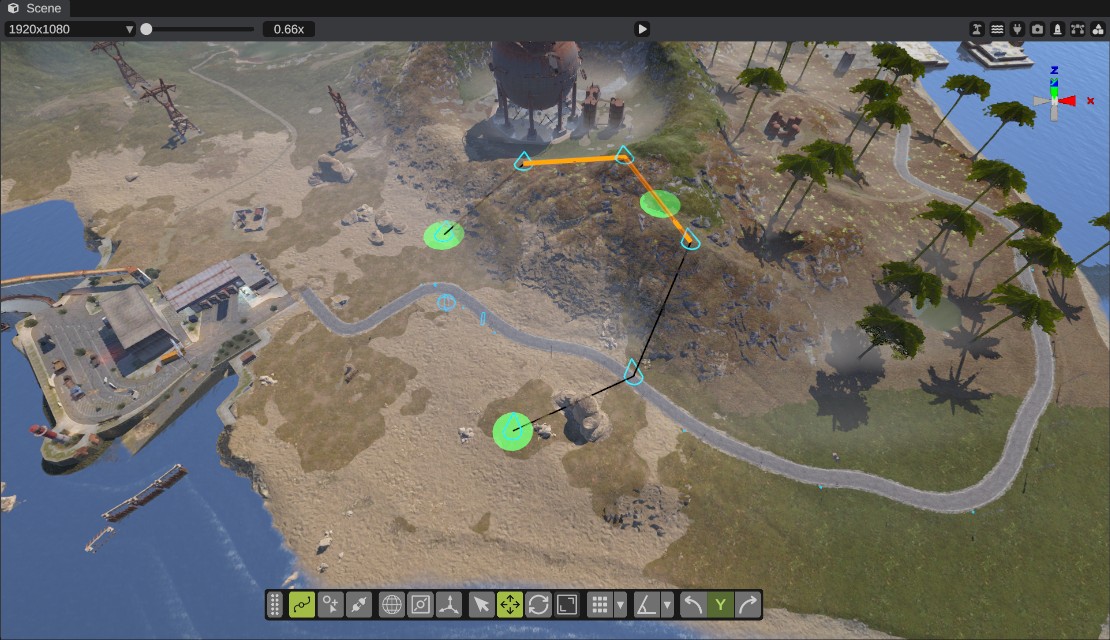
Interest nodes are the places the APC drives to and looks round. Rust needs at least one on each APC path. The APC drives to the point of the path nearest to the node, so a node must be near the path.
Interest nodes show as green dots. A node more than 10 m from the path is red: move it closer.
| Button | What it does |
|---|---|
| Add Interest Node | Adds a node where the middle of the view meets the ground. |
| Auto Interest Nodes | Puts interest nodes where Rust puts a road APC's: one at each end of an open path, and 1 to 3 along it, one for each 500 m. The old ones are removed. |
| Snap Interest Nodes | Moves every interest node onto the nearest point of the path. |
In spline edit mode, drag an interest node to move it. Each of these changes is one undo step.
You cannot delete one interest node: Delete deletes knots only. Undo right after you add it, or click Auto Interest Nodes to replace all of them.
Speed zones
A speed zone keeps the APC under a top speed on part of the path, for example on a sharp bend or a bridge. A zone goes on the curve after a knot, up to the next knot. Slow curves are drawn orange.
- In spline edit mode, select knots of the APC spline.
- Set Speed, the top speed in meters a second. An APC drives up to about 15.
- Click Slow Selected Knots.
Clear Selected Knots takes the speed zone off the curves after the selected knots. The label under the buttons counts the slow curves. A knot put in on a slow curve keeps both halves slow.
Check that the APC can drive it
Turn on Drivable to color the path by how the APC drives it:
| Color | Meaning |
|---|---|
| Green | Good. |
| Yellow | Steep: more than 20 degrees. |
| Red | Too steep: more than 30 degrees. |
| Blue | Under water: the ground is below sea level. |
| Pink box | An object is in the APC's way. |
The check measures the ground under the path. Where the spline is more than 3 m over the ground, such as on a bridge, it uses the spline's height. Drivable is not saved.
Spawning
These settings say how the server spawns APCs on the path. Linked APC paths are one network and use the settings of the network's first path.
| Option | What it does |
|---|---|
| APCs | How many APCs drive this path at once, 1 to 10. |
| Respawn | Minutes before a destroyed APC comes back. 0 uses the server's bradley.respawndelayminutes. |
| Crates | Crates dropped when the APC is destroyed. -1 uses Rust's own number. |
| Scientists | The APC lets out scientists when it is attacked. |
| Road AI | On: the scientists walk on the road navmesh, like a road APC's. Off: they use the monument navmesh, like the launch site APC's. |
What the export adds
When you export the map, RustEdit does not write the APC splines into the map as splines. It writes them into its own server data, ready for the server to use:
- Each network is a list of nodes spaced 10 m along the splines. Nodes sit 1 m over the ground. Where the spline is more than 3 m over the ground, a node keeps the spline's height.
- Each node knows its neighbors. Linked knots are one shared node, which makes the junctions. An open spline is not joined from its end back to its start.
- Each interest node is written with the path node nearest to it.
- Each speed zone becomes a box 12 m wide and 10 m tall along its part of the path, with its top speed.
- The spawn settings of the network.
When a network has no interest nodes, the export adds them like Rust does for a road APC: one at each dead end, and 1 to 3 along the path. The app tells you: "The APC path in ... has no interest nodes, which Rust needs."
The scene file keeps the full splines. When you open an exported map without its scene, RustEdit makes the APC splines again from the nodes, with fewer knots.