Path Types
Each spline of a spline entity has a type. The type says what the spline is: a road, a river, an APC route, a ridge and more. This page lists every type and explains the settings of roads, rivers and rails.
Set a spline's type
- Select the spline entity and turn on spline edit mode. See Editing splines.
- In the Inspector, set Spline Component to the component the type belongs to, for example Spline Path.
- In the component's panel, open Paths. It has one row for each spline: Spline 0 is the first spline of the entity.
- Open the row and pick a Type. The settings of that type show under the dropdown.
The dropdown lists only the types this spline can have:
- A map has one Cargo Path. When the map has one, other splines do not list it.
- Cargo Stop is listed only in the spline entity that has the cargo path.
- Types that need a higher tier are listed but greyed out, and cannot be picked.
None makes the spline a plain spline again.
All types
| Type | Spline Component | What it makes | Tier |
|---|---|---|---|
| Powerline | Spline Path | Rust's power line path. | Free |
| Road | Spline Path | A road, with Rust's road mesh. | Free |
| River | Spline Path | A river, with Rust's river mesh. | Free |
| Rail | Spline Path | A railway, with Rust's track mesh. | Free |
| APC | Spline Path | A route for the Bradley APC. See APC paths. | Free |
| Cargo Path | Spline Path | The cargo ship's patrol. See Cargo paths. | Free |
| Cargo Stop | Spline Path | An extra place the cargo ship docks. See Cargo paths. | Free |
| Road Bed | Terrain Spline | Flattens the ground along the line. See Terrain splines. | RustEdit Pro |
| Ridge / Canyon | Terrain Spline | Raises or lowers the ground along the line. | RustEdit Pro |
| Shape Area | Terrain Spline | Levels the ground inside a closed line. | RustEdit Pro |
| Paint Area | Terrain Spline | Paints splat, biome and topology inside a closed line. | RustEdit Pro |
| Prefab Line | Prefab Spline | Places prefabs along the line. See Prefab splines. | RustEdit Pro |
| Prefab Area | Prefab Spline | Scatters prefabs inside a closed line. | RustEdit Pro |
Roads, rivers and rails
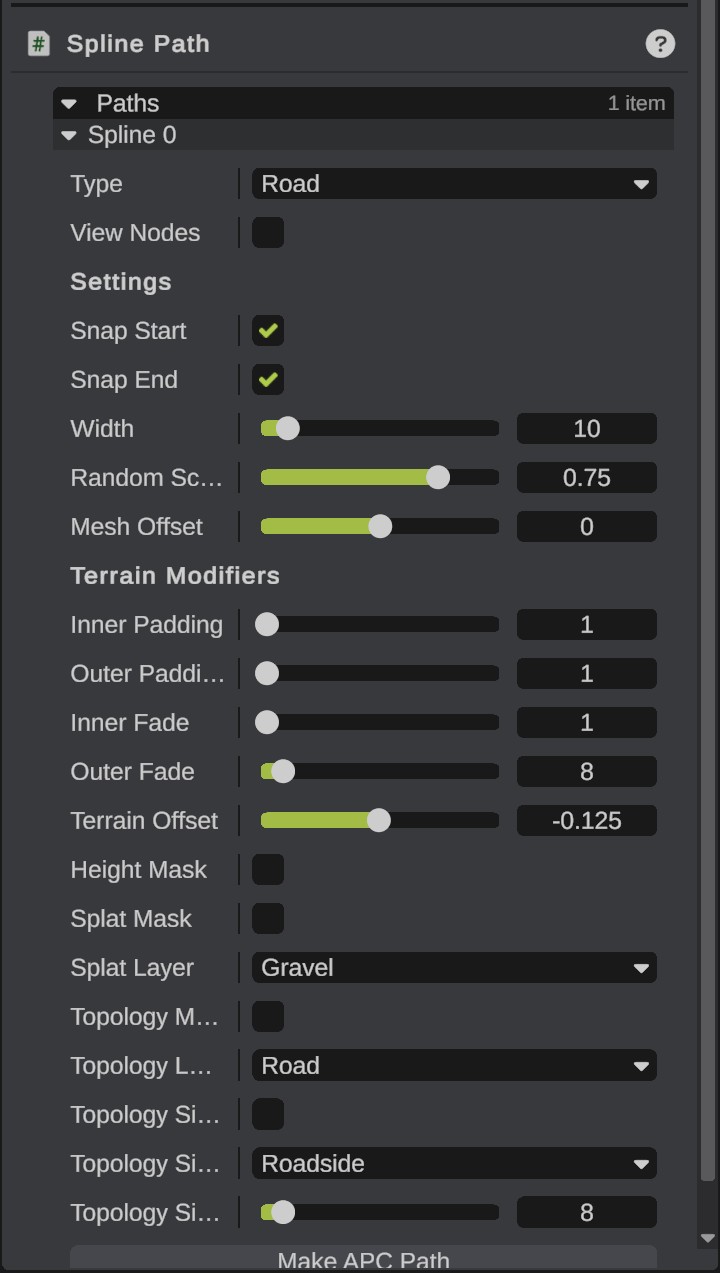
RustEdit draws a road, river or rail with Rust's own mesh as you edit the spline. When you export the map, each one goes into Rust's path list with its settings. Rust finds paths by name, so RustEdit names them by type and number: "Road 0", "Road 1", "River 0" and so on.
When a server loads the map, Rust builds the road, river and rail meshes from these paths. Rivers get their water, and trains run on the rails. Rust does not change the terrain from the paths: the height, splat and topology stay as they are in the exported map.
A road, river or rail does not change the terrain, in RustEdit or in Rust. Shape and paint the ground yourself with the terrain tools, or with a Road Bed terrain spline.
Options
| Option | What it does |
|---|---|
| Type | What the spline is. |
| View Nodes | Shows the points spaced along the path, the points the export writes. Not saved. |
| Is Siding | Rails only. Rails marked as sidings are where trains and carriages spawn. |
| Snap Start | Snaps the start of the path to the terrain. Not used on a closed spline. |
| Snap End | Snaps the end of the path to the terrain. Not used on a closed spline. |
| Width | The width of the path, in meters. |
| Random Scale | The width changes along the path, between the full width and the width times this value. |
| Mesh Offset | The height of the mesh over the spline. Negative values put it lower. |
| Inner Padding, Outer Padding | The padding from the edges of the path for terrain modifiers. |
| Inner Fade, Outer Fade | The fade distance from the inner and outer edges of the path for terrain modifiers. |
| Terrain Offset | The offset of the terrain to the height of the spline. |
| Height Mask, Splat Mask, Topology Mask, Topology Side Mask | Switches saved with the path. They do not change the terrain in RustEdit. |
| Splat Layer | The splat of the path. |
| Topology Layer | The topology of the path. |
| Topology Side Layer, Topology Side Width | The topology beside the path and its width. |
The export writes Snap Start, Snap End, Width, the paddings and fades, Random Scale, Mesh Offset, Terrain Offset, Splat Layer and Topology Layer into the map. The side topology and the mask switches stay in the scene file only.
Rust uses the terrain settings (the paddings and fades, Terrain Offset, Splat Layer and Topology Layer) only on maps it generates itself. On a map that a server loads, they change nothing.
Older versions of RustEdit 2 saved the wrong layer when you picked a Splat Layer, Topology Layer or Topology Side Layer. RustEdit corrects most of these paths when it opens the scene or map. A few cannot be told apart from a real layer: in files from an older version, check the roads, rivers and rails that show Dirt, Snow or Sand as the splat, or Field, Cliff, Summit, Beachside or Beach as a topology, and pick the layer again if it is wrong.
Defaults
A new path starts with Rust's values for its type.
| Setting | Road | River | Rail |
|---|---|---|---|
| Width | 10 | 8 | 4 |
| Snap Start, Snap End | On | On | Off |
| Random Scale | 0.75 | 0.75 | 1 |
| Mesh Offset | 0 | -0.5 | 0 |
| Terrain Offset | -0.125 | -1.5 | -0.125 |
| Inner Padding, Outer Padding | 1, 1 | 1, 1 | 1, 1 |
| Inner Fade, Outer Fade | 1, 8 | 16, 64 | 1, 32 |
| Splat Layer | Gravel | Stones | Gravel |
| Topology Layer | Road | River | Rail |
| Topology Side Layer | Roadside | Riverside | Railside |
Roads
- A road narrower than 5 m has no mesh.
- A road wider than 10 m uses the asphalt of Rust's ring road.
- Rust ranks roads: a closed road or one wider than 10 m is ranked like the ring road, one narrower than 5 m is ranked lowest.
- Make APC Path makes a new spline entity with an APC path that follows the road. It gets interest nodes where Rust puts a road APC's. Find it in the Hierarchy. See APC paths.
Rivers
Like Rust's rivers, a river gets wider along its length, and widest at its last knot. Draw a river from its source to the sea. Rivers also set the way water flows, for example for water wheels.
Rails
A closed rail is ranked like Rust's rail ring. Use Is Siding for the short tracks where trains and carriages spawn.
Power lines
A Powerline spline has no settings and RustEdit draws no mesh for it. The export writes its knots as the nodes of Rust's power line path. A closed spline ends on its first knot again.
Rust does not place poles or wires from this path when a server loads the map. The poles in the game are the pole prefabs placed in the map. Place them yourself, for example along the spline with a Prefab Line.
APC paths, cargo paths and cargo stops
These are not Rust paths. They are routes for the APC and the cargo ship. RustEdit writes them into its own server data, which the RustEdit 2 server extension reads on a server. See APC paths and Cargo paths.