Apply and Preview
RustEdit ProWhile the Terrain Graph window is shown, the terrain shows the graph's result live. The map itself does not change until you click Apply.
Live preview
- The preview starts when the window is shown.
- After every change to the graph, the graph runs again and the terrain shows the new result.
- The scene view builds the terrain from the graph's result in place of the map's own maps. The map's data stays as it was.
- Prefabs that change the terrain, such as monuments, and terrain splines still change it on top of the result, as they do on the map.
- The preview ends when the window is hidden, for example behind another tab, or closed. The terrain then shows the map again.
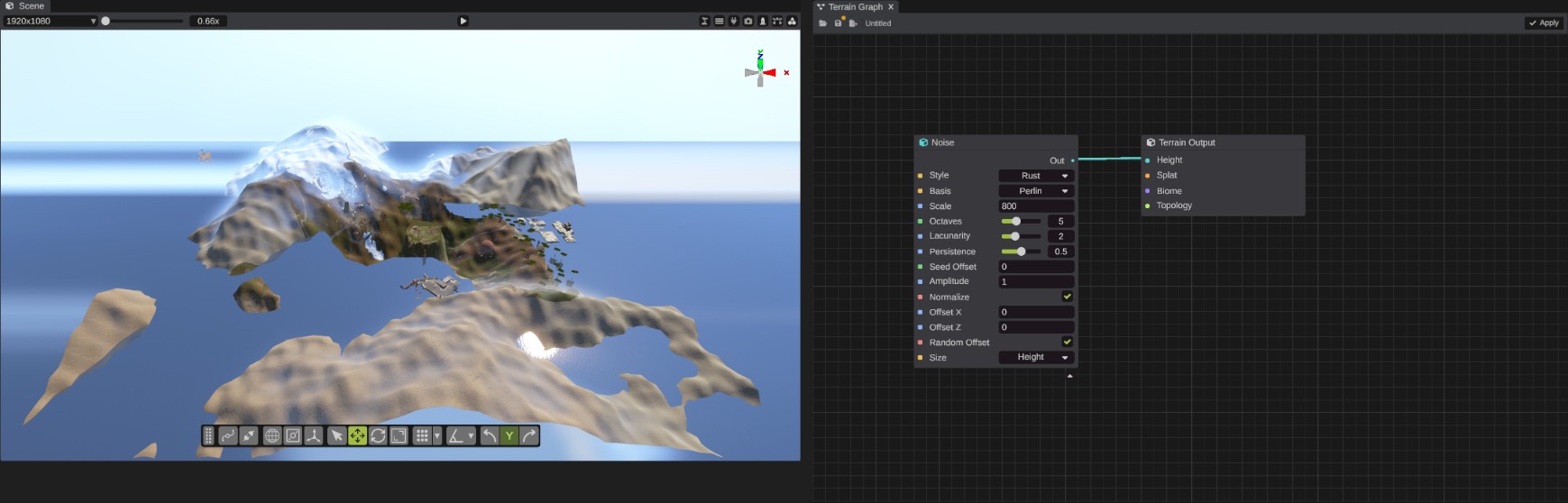
What the preview shows
Each input of the Terrain Output node stands for one map:
| Terrain Output input | Wired in | Not wired |
|---|---|---|
| Height | The terrain takes the graph's height. | The map's own height. |
| Splat | The ground textures come from the graph. | The map's own splat. |
| Biome | The biomes come from the graph. | The map's own biomes. |
| Topology | Not shown yet. The map's own topology stays. | The map's own topology. |
So a graph with only Splat wired in repaints the ground on the map's real hills.
The preview is not part of the map
- Saving the map saves the map's own terrain, not the preview.
- Exporting a
.mapfile takes the preview off while the terrain is built for the export, then puts it back. An unapplied preview never reaches the.mapfile. - The Current Map node reads the map, not the preview.
Apply the result
- Check the result in the scene view.
- Click Apply in the Terrain Graph window's toolbar. RustEdit writes the result into the map.
What Apply changes:
| Terrain Output input | Apply |
|---|---|
| Height wired in | The whole height map is replaced by the graph's height. Values are kept between 0 and 1. |
| Splat wired in | The whole splat map is replaced. |
| Biome wired in | The whole biome map is replaced. |
| Topology wired in | The whole topology map is replaced. The terrain does not show topology, so the preview does not change. |
| Nothing wired in | That map is left as it is. |
Apply never changes the alpha map, the water, prefabs or splines. Each result is brought to its map's own size first, so a graph worked at one size still fits a map of another.
After Apply, the terrain shows the map itself, which now holds the result. The preview comes back with your next change to the graph.
In a multiplayer session, the changed maps are sent to everyone in it.
The preview and Apply need RustEdit Pro. Without it, the window is locked and says "This feature requires RustEdit Pro". If you sign out while the window is open, the preview stops and the terrain shows the map again.
Undo Apply
Apply is one step in the map's undo history.
- Move the pointer off the graph, for example over the scene view.
- Press Ctrl+Z. The maps go back to how they were before Apply.
While the pointer is over the graph, Ctrl+Z undoes graph edits instead. See Undo.
Tips
- Wire in only the maps you want to change. For example, to repaint the ground of a map you like, build a graph from Current Map and wire only Splat.
- A graph that starts from Current Map reads the map as it is. After Apply, the map holds the result, so applying the same graph again builds on top of the last result.
- To compare two versions, put both in the graph and choose between them with a Field Switch node. The preview follows the switch.
Troubleshooting
| Problem | What to do |
|---|---|
| The terrain does not change while I edit. | Check that your nodes are wired toward the Terrain Output node. Only nodes that lead to it run. Check that the window is shown, not hidden behind another tab. |
| The terrain jumps back to the map. | The window was hidden or closed, which ends the preview. Show the window again. |
| Apply does nothing. | Wire something into the Terrain Output: Height, Splat, Biome or Topology. |