Play Mode
RustEdit PlusPlay mode turns the camera into a Rust player. You walk the map with the game's own movement, so you can check that a jump can be made, a ladder reaches the top, or a door is in reach, before players find out. The map's IO entities run too. When you stop, everything goes back the way it was.
Before you start
- Play mode needs RustEdit Plus. Without it, the play button is greyed out, and a click on it says it needs RustEdit Plus. See Tiers.
- A map must be open and loaded.
- The player starts where the camera is: its eyes are at the camera, facing where the camera faces. Fly the camera close to the ground where you want to start. If the camera is high in the air, the player falls to the ground.
How to start and stop
- Move the camera to where you want to start.
- Click the play button in the middle of the scene view header. The mouse is caught in the view and turns the camera. The log says "Playing. Press Escape to free the mouse, then the stop button to stop."
- Walk around. See Controls.
- To stop, press Escape to free the mouse.
- Click the stop button, in the same place as the play button. The camera stays where the player's eyes were.
While the mouse is free, click in the scene view to catch it again. Opening another map also stops Play mode.
Controls
| Key | What it does |
|---|---|
| W A S D | Walk. These are the keys that move the camera, so if you changed them, Play mode uses yours. |
| Mouse | Look around. |
| Shift | Sprint. |
| Ctrl | Duck. |
| Space | Jump. In water at an edge, climb out. On a ladder, let go. |
| E | Use what you look at. Hold it to turn a wheel. |
| Escape | Free the mouse, so you can reach the stop button. |
| Mouse Left in the scene view | Catch the mouse again. |
How the player moves
- The player moves as in the current Rust game: it walks at 2.8 m a second, sprints at 5.5 and ducks at 1.7. It slides on steep slopes and steps up onto steps up to 0.5 m high.
- The physics run at the game's rate, 32 steps a second, with the game's gravity. A jump reaches the same height as in the game.
- The player bumps into what a Rust player bumps into. Cave entrances let the player through the ground, as in the game.
- A ceiling lower than 1.45 m makes the player duck.
- Move into a ladder to grab it, as in the game.
- In deep water the player swims: in the sea, lakes and rivers.
- The player rides on moving floors, such as lifts and elevators.
- There is no fall damage, and no clothing, held items or effects that change the speed.
Nothing else in the map moves or falls while you play. Other objects with physics are held still.
Use things
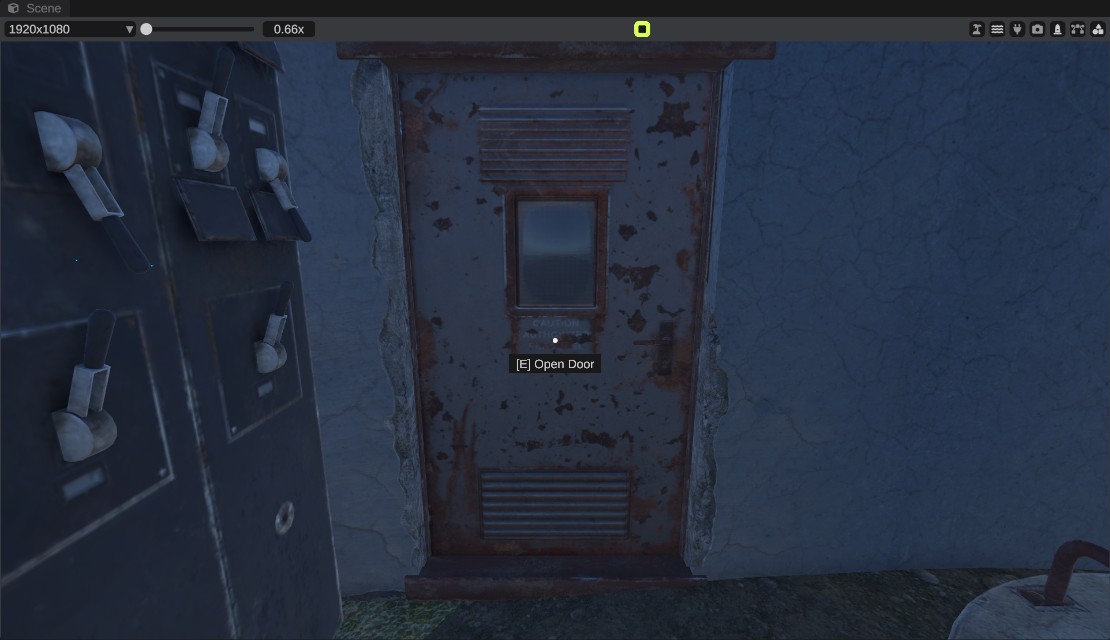
Look at a door, switch or other usable thing within 3 m. A line under the crosshair says what E does, for example [E] Open Door. Press E.
What you can use, and what the IO entities do while you play, is on IO in Play mode.
While you play
- The editor stays on screen, but you cannot use it. The panels, the menu and the toolbar are dimmed. The scene view's widgets and the camera gizmo are hidden.
- Keyboard shortcuts do nothing, so you cannot save or undo by accident.
- When play starts, the selection is cleared. The terrain tool, the prefab brush and the cliff brush turn off, and spline and socket editing ends.
When you stop
Everything you changed while playing goes back: doors, lights and switches return to how the map has them, and every IO entity is put back. Nothing you did while playing is saved, and nothing is added to undo.
Troubleshooting
| Problem | What to do |
|---|---|
| The play button is greyed out | Play mode needs RustEdit Plus. See Tiers. |
| Nothing happens when you click play | Open a map and wait until it has loaded. |
| The mouse does not turn the camera | Click in the scene view to catch the mouse. |
| You cannot click the stop button | Press Escape first to free the mouse. |
| The player falls a long way at the start | The player starts at the camera. Fly the camera down to the ground before you click play. |
| No [E] line shows for a door or switch | Get closer: you can use things within 3 m. Some things need power first, see IO in Play mode. |