Trigger Volumes
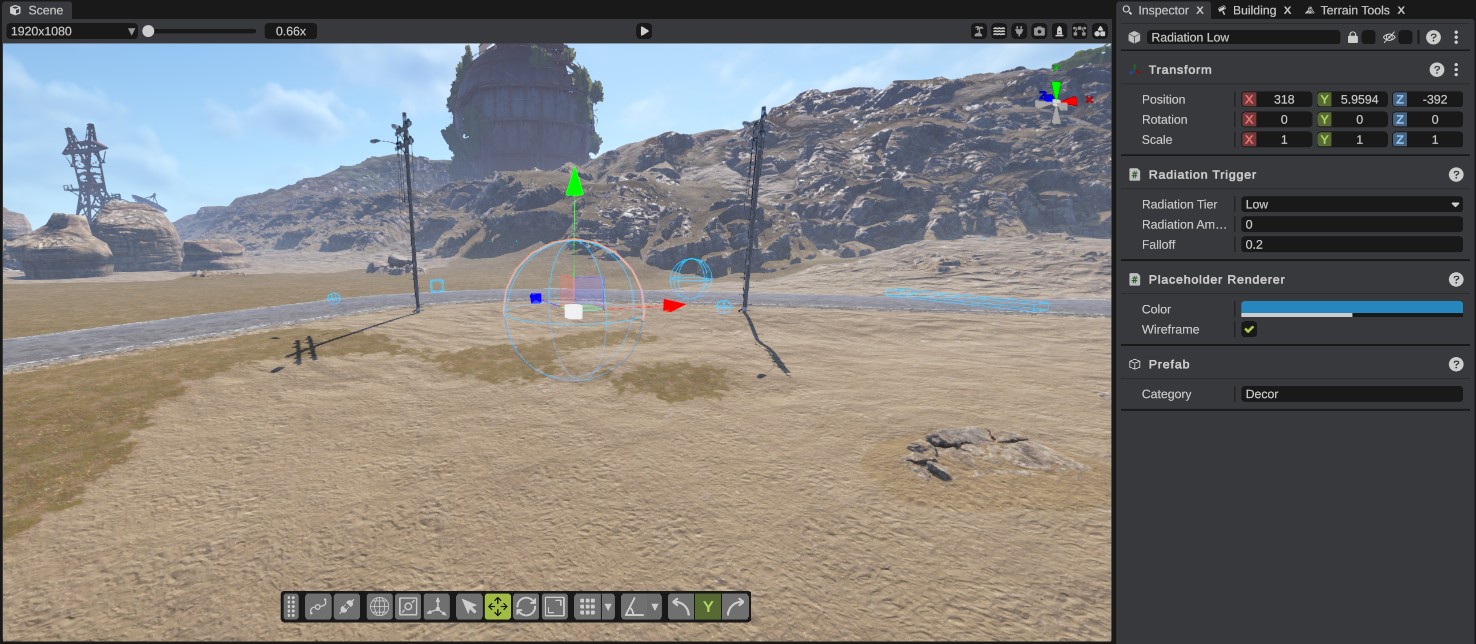
Trigger volumes are invisible areas that change the players and other entities inside them. A hurt trigger burns, a radiation trigger gives radiation, a heat volume warms. Rust has prefabs for them that you place like any other prefab. When you select one, the Inspector shows a panel to set what it does.
Find trigger volumes
Rust's trigger volumes are in the Content Browser, under Rust's modding prefabs. Some of Rust's other prefabs have a trigger inside them too. The modding prefabs show these panels:
Prefabs (in modding) | Panel |
|---|---|
radiation/radiation_low, radiation_med, radiation_high | Radiation Trigger |
volumes_and_triggers/comfort_volume | Comfort Trigger |
volumes_and_triggers/heat_volume | Temperature Trigger |
volumes_and_triggers/hurt/fire_trigger_med, fire_trigger_high, fire_trigger_death | Temperature Trigger |
volumes_and_triggers/hurt/damage_trigger_low, _mid, _high, _death | None |
volumes_and_triggers/trigger_force | None |
The game files that RustEdit reads leave out the damage and the push of these volumes: Rust keeps them on the server only. So the damage triggers and trigger_force show no trigger panel, and the fire triggers show only their temperature. You cannot change their damage or force in RustEdit. They keep Rust's own values.
A trigger volume has no model in the game. RustEdit draws it as a placeholder shape, so you can see and select it. See Placeholders. The volume's size is the prefab's size: scale the prefab to make the volume bigger or smaller.
The trigger panels
| Panel | What it does in Rust |
|---|---|
| Hurt Trigger | Deals damage of one type, every second, to everything inside that can be hurt. |
| Hurt Trigger Extended | Deals damage when something enters, while it stays, as it moves and when it leaves. Each can mix several damage types. |
| Radiation Trigger | Gives radiation to players inside. It is strongest in the middle and fades at the edge. |
| Temperature Trigger | Warms or cools players inside toward its temperature. It can also make shade at certain hours. |
| Comfort Trigger | Gives players inside comfort, as a campfire or a chair does. |
| Wetness Trigger | Makes players inside wet. |
| Force Trigger | Pushes entities inside in one direction. |
The Hurt Trigger, Hurt Trigger Extended and Force Trigger panels show only on a prefab whose game files keep that part. Rust's modding damage and force volumes do not, see Find trigger volumes.
How to set a trigger
- Place the trigger prefab from the Content Browser. See Placing prefabs.
- Move and scale it to cover the area you want.
- Select it. The Inspector shows its trigger panel.
- Change the values.
To change several triggers of the same kind at once, select them all. The damage lists of Hurt Trigger Extended show only when one trigger is selected.
Hurt triggers
A Hurt Trigger deals Damage Per Second of one Damage Type. It splits the damage into Damage Tick Rate hits a second. With 10 damage per second and a tick rate of 4, it deals 2.5 damage four times a second.
A Hurt Trigger Extended checks everything inside it every Rate seconds. It has four lists of damage, and each list can have several rows of Damage Type and Damage Amount:
| List | When it deals the damage |
|---|---|
| Damage On Enter | Once, when something enters. |
| Damage On Timer | The amount each second while something stays inside, split over the ticks. |
| Damage On Move | The amount for each meter something moves inside. |
| Damage On Leave | Once, when something leaves. |
Each list has its Hurt Type. Simple deals plain damage. Include Bleeding And Screen Shake deals the damage as an attack, which can make players bleed and shakes their screen. Turn Damage Enabled off to stop all of its damage.
Radiation
A Radiation Trigger gives the radiation of its Radiation Tier:
| Tier | Radiation |
|---|---|
| Minimal | 2 |
| Low | 10 |
| Medium | 25 |
| High | 51 |
Set Radiation Amount Override above 0 to use your own amount instead. A player's radiation protection takes its value off the amount.
The radiation is full in the middle of the volume and fades to nothing at the edge. Falloff is how much of the radius it fades over: with 0.1, it fades over the outer tenth.
Temperature, comfort and wetness
- A Temperature Trigger moves the temperature of a player inside toward its Temperature. The nearer the middle, the closer it gets.
- With Sunlight Blocker on, it does something else: between Block Min Hour and Block Max Hour, a player inside who cannot see the sun gets Sunlight Block Amount degrees colder. Its Temperature is then not used. The three sunlight rows can be changed only while Sunlight Blocker is on.
- A Comfort Trigger gives Base Comfort within Min Comfort Range meters of its middle. Further out, the comfort fades to nothing at the edge. Each other player inside adds a little more.
- A Wetness Trigger makes a player as wet as Wetness in its middle, less toward the edge.
Force
A Force Trigger moves the entities inside it at its Velocity, in meters a second. The direction is in the trigger's own axes, so it turns when you turn the prefab.
What is saved
- RustEdit saves the trigger values in the scene file.
- The exported map carries them too, in RustEdit's own data in the map. When you open the exported map in RustEdit, each trigger gets its values back. See Save and Export.
- Changes in these panels are not undo steps.
- Play mode does not run trigger volumes: you cannot test damage or radiation by walking into them.
Rust itself places trigger volumes from the map's prefab list, with Rust's own values. It does not read RustEdit's data. On the server, the RustEdit 2 server extension gives the trigger volumes your values. A server without the extension uses Rust's values, not yours. See The RustEdit 2 server extension.