Placing Prefabs
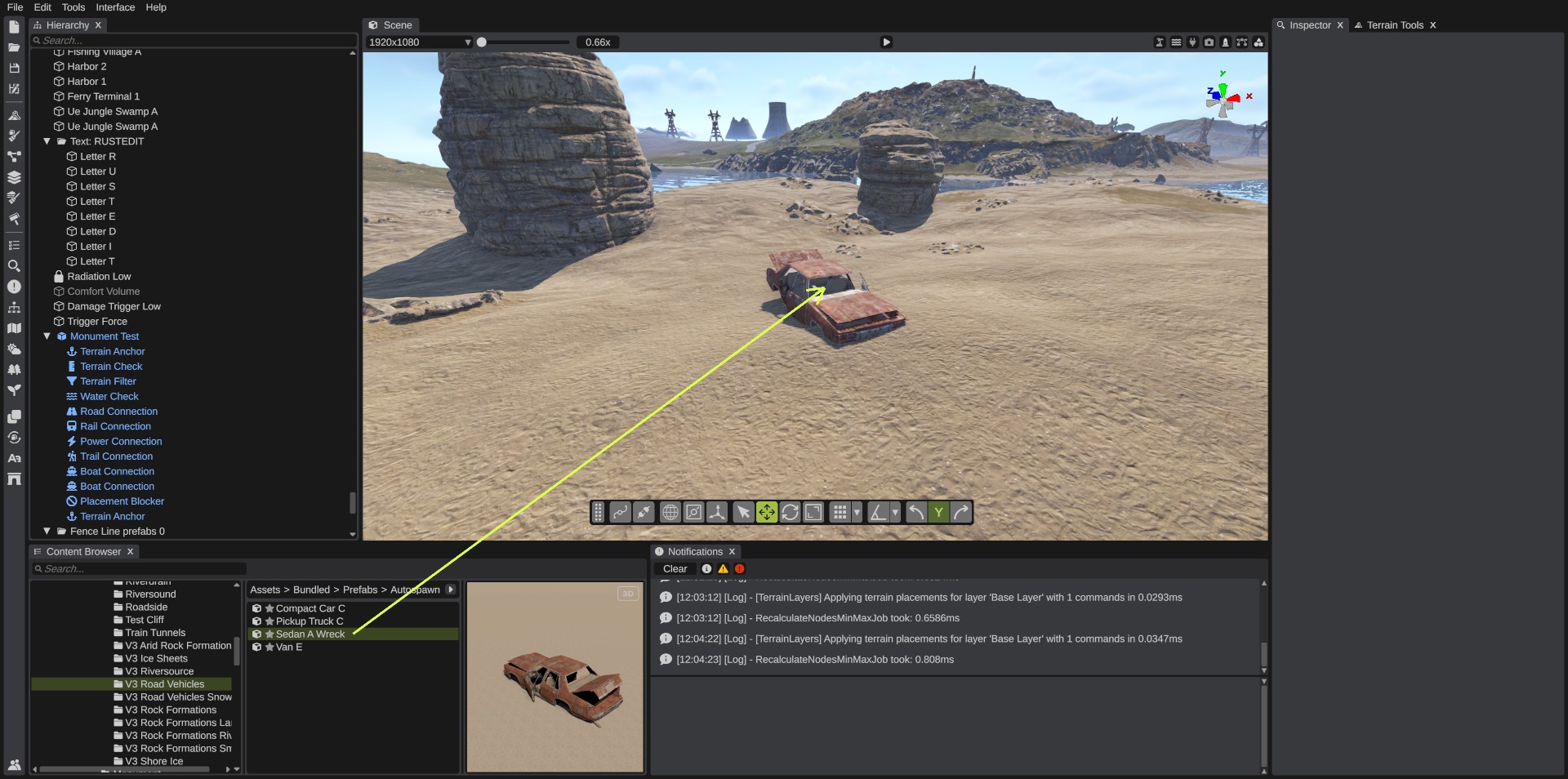
You place prefabs by dragging them from the Content Browser into the scene view. The prefab follows the pointer over the ground and other objects, and stays where you let go. The same works for monuments, spline shapes and monument parts.
How to place a prefab
- Find the prefab in the Content Browser.
- Hold the left mouse button on its row and drag it into the scene view. When the pointer enters the scene view, the prefab appears under it.
- Move the pointer. The prefab's pivot sits on the first surface under the pointer: the terrain, or another prefab.
- Release the mouse button. The prefab stays there and is selected, so you can move or turn it with the gizmo right away.
Press Ctrl+Z to take the placement back.
To cancel, drag the prefab back out of the scene view and release the button there. The prefab is removed. Esc does not cancel a drag.
While you drag:
- The camera does not move.
- You cannot turn the prefab: prefabs and monuments come in with a rotation of 0, and spline shapes and monument parts face the way the camera looks. Turn the prefab with the gizmo after you place it.
- The prefab does not tilt to the slope of the ground, and grid snapping is not used.
- Surfaces farther than 500 m are ignored. If the pointer enters the scene view over the sky, the prefab appears at the middle of the world (0, 0, 0) until the pointer is over a surface. To avoid this, bring the pointer into the scene view over the ground.
Big prefabs, such as large monuments, take a moment to load. Until they are ready, a box with "Loading ..." and the prefab's name shows where they will be.
Place with a double-click
Double-click a row in the Content Browser, or right-click it and click Place in Scene. The prefab is placed on the first surface in the middle of the view, or 20 m in front of the camera when the middle of the view is sky. It is selected, and Ctrl+Z takes it back.
Put it on the ground
The pivot of a dragged prefab sits on the surface under the pointer. To fix the height later:
- or Ctrl+Alt+Mouse Middle puts each selected object's pivot on the terrain.
- Ctrl+Alt+Mouse Left (Move to Mouse) moves the selection to the terrain point under the pointer.
- The gizmo's free-move square (the gray square in the middle) keeps the object on the terrain while you drag it.
Terrain modifiers
In the game, many monuments and some other prefabs change the terrain under them: they flatten the ground, paint it, set its biome or topology, or cut holes in it. RustEdit shows these changes with terrain modifiers.
- On a Rust prefab you place, the terrain modifiers are off. Select the prefab and turn them on in its Terrain Modifier panel in the Inspector: Apply Height, Apply Splat, Apply Biome, Apply Topology and Apply Alpha. The panel only shows for prefabs that have terrain modifiers.
- A monument you made with saved terrain has its terrain modifiers on when you place it.
While you drag a prefab in from the Content Browser, its terrain modifiers wait. The terrain does not change while the prefab follows the pointer. It changes once, where you drop the prefab. A double-click places it and changes the terrain at once.
When you move, turn or scale a placed prefab with terrain modifiers on, the terrain updates after the move. When you delete it, or undo its placement, the terrain goes back to how it was.
What new prefabs get
- The category Decor. See Prefab.
- The prefab's default settings, for example Indestructible on for Base Combat Entity objects.
- If a custom data manifest lists the prefab, its default values.
Other ways to place prefabs
- Prefab Brush: paint many prefabs at once.
- Building tool: build with Rust's building blocks.
- Generate Text: write words with sign letters.
- Duplicate: copy objects that are already placed.
Troubleshooting
| Problem | What to do |
|---|---|
| The prefab jumped to the middle of the map. | The pointer came into the scene view over the sky. Keep dragging over the ground. |
| The dropped prefab is not selected and Ctrl+Z does not take it back. | Spline editing or the socket editor was on. They lock the selection, so a prefab placed then is not selected and is not an undo step. Turn them off before you place prefabs. To remove the prefab, select it afterwards and delete it. |
| The terrain did not change under a monument. | Turn on its terrain modifiers in the Terrain Modifier panel. |
| A big prefab shows only a box. | It is still loading. Wait a moment. |