Placeholders
Many Rust prefabs have nothing you can see: spawners, sound emitters, triggers, radiation zones, building blockers, NPC spawn points. In the game they work without a model. In RustEdit you still need to see, click and move them, so RustEdit draws a placeholder for each one: a simple colored shape where the prefab is.
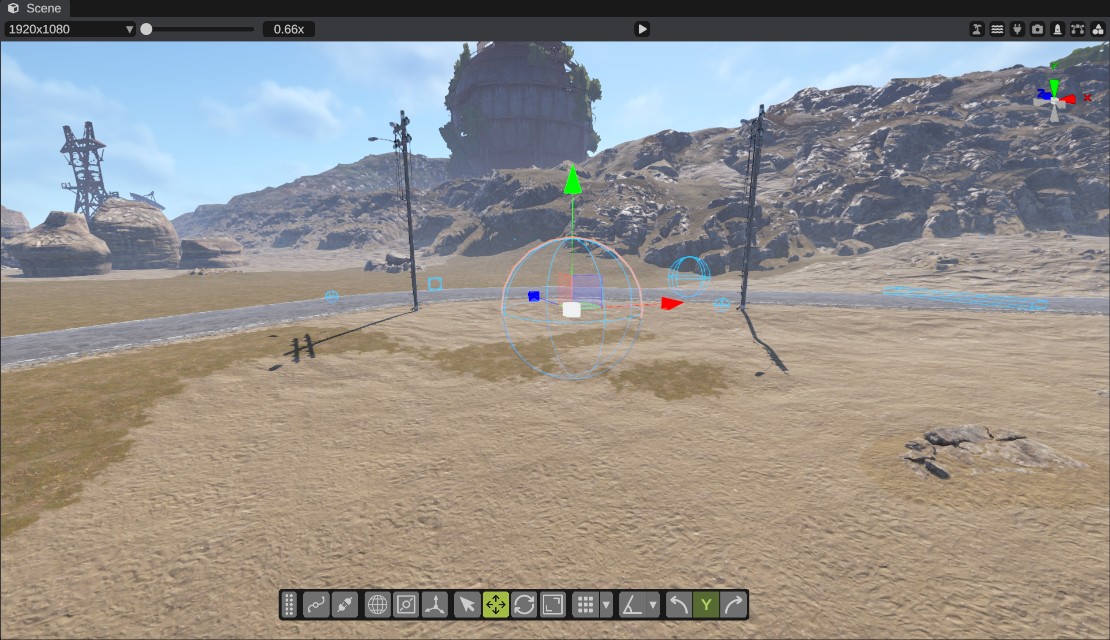
How placeholders look
- Shape: the prefab's own shape when it has one (its mesh, box or sphere collider). A prefab with no shape of its own gets a box or a sphere about 1 m across.
- Color: most placeholders are light blue. Some have their own color: Monument Markers are purple and radiation spheres are green.
- Wireframe or solid: placeholders are wireframes (lines) by default. You can make a kind of placeholder solid in the Inspector.
- Colors are flat: placeholders have no lighting.
RustEdit draws placeholders that are within 500 m of the camera. Selected placeholders are drawn at any distance. A placeholder that you hide is not drawn.
When the camera is inside a solid placeholder, for example a big radiation zone, you only see its inside faces, so the rest of the scene stays visible.
A selected placeholder gets the same selection outline as other objects.
Which prefabs are placeholders
RustEdit has a built-in list of the Rust prefabs that are placeholders, about 260 of them. A prefab is a placeholder only when it is on that list. You cannot add a prefab to the list in the app.
Show or hide placeholders
Click the Show placeholders button in the scene view's header (the shapes icon) to hide all placeholders, and click it again to show them. The icon is dimmed while placeholders are hidden. RustEdit remembers the setting the next time you start it.

A box selection never picks a placeholder, shown or hidden. Click it, or select it in the Hierarchy.
While placeholders are hidden, a single click can still select one where it would be.
Change how a kind of placeholder looks
- Select a placeholder in the scene view.
- In the Inspector, find the Placeholder Renderer panel.
- Change Color or Wireframe. For a placeholder that has no shape of its own, you can also pick Type: Cube or Sphere.
The change applies to every copy of that prefab, and to the copies you place later. It is not saved in your map: RustEdit saves it at once in Configuration/placeholders.json, next to the app, so it applies to every map.
Troubleshooting
| Problem | What to do |
|---|---|
| I cannot see any placeholders. | Turn on Show placeholders in the scene view's header. Move the camera closer: placeholders farther than 500 m are not drawn. |
Placeholders are gone after I edited placeholders.json by hand. | The file has an error, so RustEdit reads no placeholders from it. Fix the file, or delete it and restart RustEdit to get the built-in list back. |
| I want the default colors back. | There is no reset button. Close RustEdit, delete Configuration/placeholders.json and start RustEdit again. |
| A box selection does not pick a placeholder. | A box only picks objects with a model. Click the placeholder instead, or select it in the Hierarchy. |
Once you change a placeholder in the Inspector, placeholders.json holds the whole list. Placeholders that a later RustEdit version adds to its built-in list then do not show for you until you delete the file.